
Tools · RSPS Banner Maker
RSPS Banner Maker
Animated banners in minutes, free
Make an animated GIF banner for your server in the browser: pick a template, a scene and a frame, type your messages, drop in your logo, download. Wide sizes for the toplists, boxy ones for sidebars, and it works on every toplist, not only RuneList.
- Thirteen templates by server type, each with a wide and a boxy layout.
- Rotating messages, animated effects, frames, buttons and your logo, all drawn live.
- Downloads a GIF any toplist accepts, plus a PNG still; nothing leaves your browser but the file.
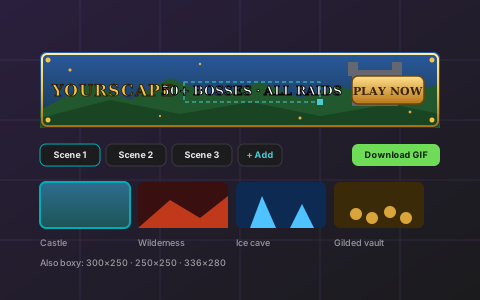
Make your banner
Loading the banner maker…
What RSPS Banner Maker does
Look at the top of any RSPS toplist and the banners follow one formula: a logo or name on the left, a big message in the middle that changes every couple of seconds, a gold Play Now on the right, embers or sparkles drifting over a dark fantasy scene. The Banner Maker builds exactly that, so a new server can look like an established one on day one.
Everything is a layer you can drag: text with gold, fire or ice presets, your logo, a button, a badge. Scenes rotate your messages with fades, slides or zooms; effects such as embers, snow, stars and fog animate on top of a built-in scene or your own screenshot. The preview shows the banner inside a mock toplist row at real size, so what you see is what players see.
The result is a GIF, the one animated format every toplist accepts, made in your browser and sized to stay under the usual 2 MB limits. Make the wide 468×60 for listings and the boxy 300×250 for sidebars from the same project. Upload it to your RuneList listing and it becomes a light video on the list automatically.
How it works
Pick a template
PvP, Old School, RSC, Pre-EoC, Custom, Economy, Ironman, PvM, Leagues, Spawn, Coming soon, New server or Launch. Each comes with a scene, a frame, fonts and a message rotation.
Make it yours
Type your server name and messages, drop in your logo, change the scene, frame, effect and button. Drag anything where you want it; add scenes for more messages.
Check it in context
The preview shows the banner in a mock toplist row or sidebar at real size. Switch between the wide and boxy sizes; both come from the same project.
Download and use it
Download the GIF (and a PNG still if you like), upload it as your listing banner here and on every other toplist. Save the project file to edit it later.
What it can do
Templates by server type
Thirteen starting points that already look like the top of the list; change anything after.
Scenes, frames, effects
Twelve OSRS-inspired scenes made for RuneList, ten frames, six animated effects, badges, six button styles.
Real text tools
Eight fonts, gold and gradient fills, outlines, glow, letter spacing, typewriter and shimmer animations.
Scenes and motion
Up to six scenes with their own timing, fade, slide or zoom transitions, enter and exit animations per layer.
Wide and boxy
468×60 and 728×90 for lists, 300×250, 250×250 and 336×280 for sidebars, from one project.
Yours, offline
A GIF under 2 MB, a PNG still, a project file to reopen, a share link for your staff. No account, nothing uploaded.
Questions
Is it really free?
Yes, for everyone, whether or not your server is listed on RuneList. There is no watermark.
Can I use the banner on other toplists?
Yes. It is a normal GIF file; every toplist that takes an animated banner takes it. The wide size fits most lists, and the boxy sizes fit sidebar and square ad spots.
Are the backgrounds from RuneScape?
No. They are original scenes made for RuneList in an Old School-inspired style, so you are not using anyone else's art. You can upload your own screenshot as a background if you prefer.
Why a GIF and not a video?
Because toplists, including this one, accept GIFs everywhere and videos almost nowhere. When you upload the GIF to your RuneList listing, RuneList converts it to a light video for the list itself.
Where is my banner saved?
In your browser, automatically, and in the project file you can download. Nothing is stored on RuneList in this version.
How do I put it on my listing?
Download the GIF, then upload it as the banner under My servers, or add it to your banner library to use in an ad.
Ready to try RSPS Banner Maker?
Free, no account needed. Sign in, pick your server, and it is on in a few minutes.
More tools:RuneVote: One vote page for every toplistRuneTrack: Know which links bring players