
Tools · RuneTrack
RuneTrack
Know which links bring players
Tracked links for everywhere you promote your server: toplists, creators, ad spots, Discord. See clicks, where they came from, and how many of those people went on to vote or to join your game.
- One short link per toplist, creator, ad spot or Discord, all compared on one chart.
- Clicks, unique visitors and bots kept apart, with country, referrer, device and browser.
- Sees who went on to vote for you, or to join your game, not just who clicked.
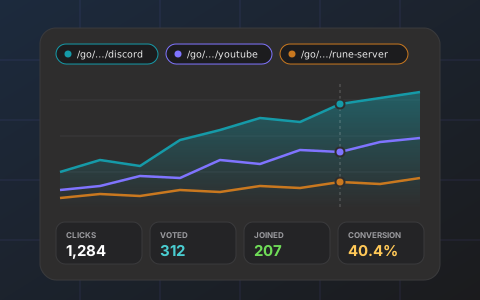
What RuneTrack does
You are listed on several toplists, you pay a YouTuber now and then, you buy the odd banner, and you post in Discord. Which of those brings players? A tracked link answers that. RuneTrack gives you short links of the form runelist.io/go/yourserver/anything: one for each place you promote, each pointing wherever you like.
Every click is recorded with its country, referrer, device and browser, and bots and crawlers (Discord previews, search engines, scripts) are recognised and kept apart from people. Then comes the part other link shorteners cannot do: RuneTrack knows who votes on RuneList and, if your game reports logins, who joined. So each link shows not only how many people clicked, but how many of them went on to vote for you or to log in to your game.
The dashboard compares links on one chart, breaks clicks down by referrer, country, device and browser, lists the last thousand clicks, exports everything as CSV, and sends a summary every Monday with the change against the week before. Tracking parameters such as utm_source are passed through to the destination, so your own analytics keep working.
How it works
Make a link
Under Tools → RuneTrack, choose a name (discord, youtube-max, rune-server) and where it should go: your website by default, or any page you like. You can change the destination later without changing the link.
Put it where you promote
Use the link as your website URL on a toplist, give it to a creator, put it behind a banner, or pin it in Discord. One link per place is what makes them comparable.
Optionally, report joins from your game
A few lines in your login handler send the player's address to RuneTrack with your API key. Joins are matched to the click that brought them; addresses that never clicked are ignored.
Read the numbers
Clicks, unique visitors, bots, votes, joins and a conversion rate per link, on a chart by day or by hour, plus where clicks come from. Every Monday the week's summary lands in your inbox.
What it can do
Conversions, not just clicks
A click converts when that visitor votes for you on RuneList within seven days (having not voted in the seven days before), or when your game reports their login within seven days.
Bots kept apart
Link previews (Discord, Telegram and the like), search crawlers, scripts, requests without browser headers and bursts from one address are named and counted separately, so people-numbers stay honest.
Compare links on one chart
Overlay up to three links by day or by hour and see which toplist or creator actually sends players.
Where clicks come from
Referrer, country, device and browser for every link, and the last thousand clicks one by one.
Weekly summary
Every Monday: clicks, visitors, votes and joins with the change against the week before, your best links and top sources.
Yours to keep
Export every click as CSV, and pass utm_* parameters through to your own analytics. Destinations are editable; history is never lost.
Questions
What is a tracked link?
A short address such as runelist.io/go/yourserver/discord that sends the visitor straight on to a page you choose, and records the click on the way.
How does RuneTrack know a click led to a vote?
A vote on RuneList by the same address within seven days of the click, from someone who had not voted in the seven days before, counts as a conversion of that click.
How does it know someone joined my game?
Two ways. Votes need nothing from you: a vote for your server on RuneList within 7 days of the click counts as a conversion of that click. Joins need your game to report logins: a small request from your login handler with the player's address and your API key (example code for Java and Kotlin is on the dashboard). RuneTrack matches each reported login to the click that brought that address, if there was one.
Can I use it for toplists other than RuneList?
Yes, that is the main point. Set the tracked link as your website URL on every toplist you are listed on and compare them.
What happens to a link I no longer need?
Archive it. Anyone who still clicks it lands on your RuneList page, its history stays, and you can restore it later.
Is the visitor slowed down?
No. The redirect is sent at once and the click is recorded afterwards.
Ready to try RuneTrack?
Free for every server listed on RuneList. Sign in, pick your server, and it is on in a few minutes.
More tools:RuneVote: One vote page for every toplistRSPS Banner Maker: Animated banners in minutes, free